
 Babel原理

# 什么是 AST
抽象语法树(Abstract Syntax Tree),简称AST,是源代码的抽象语法结构的树状表现形式。
webpack,eslint 等很多工具的核心都是通过抽象语法树来实现对代码的检查、分析等操作。
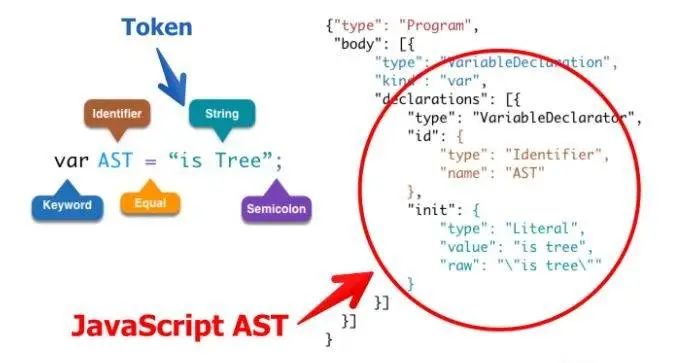 上图中对应的:
var是一个关键字AST是一个定义者=是 Equal 等号的叫法有很多形式is tree是一个字符串;是 Semicoion
首先一段代码转换成的抽象语法树是一个对象,该对象会有一个顶级的 type 属性Program;
第二个属性是body一个数组。body数组中存放的每一项都是一个对象,里面包含了所有的对于该语句的描述信息
type:         描述该语句的类型  --> 变量声明的语句
kind:         变量声明的关键字  --> var
declaration:  声明内容的数组,里面每一项也是一个对象
            type: 描述该语句的类型
            id:   描述变量名称的对象
                type: 定义
                name: 变量的名字
            init: 初始化变量值的对象
                type:   类型
                value:  值 "is tree" 不带引号
                row:    "\"is tree"\" 带引号
2
3
4
5
6
7
8
9
10
11
# 词法分析和语法分析
js 是解释性语音,一般通过 词法分析 -> 语法分析 -> 语法树,就可开始解释执行了
词法分析:也叫扫描,是将字符流转换为记号流(tokens),它会读取我们的代码然后按照一定的规则合成一个个的标识
如var a = 2
;[
  { type: 'Keyword', value: 'var' },
  { type: 'Identifier', value: 'a' },
  { type: 'Punctuator', value: '=' },
  { type: 'Numeric', value: '2' },
]
2
3
4
5
6
当词法分析源代码的时候,会一个一个字符读取代码,称之为扫描-scans,当遇到空格、操作符或者特殊符号的时候,它会认为一个话已经完成了。
语法分析:也称解析器,将词法分析出来的数组转换成树的形式,同时验证语法,语法若有错,抛出语法错误
{
  ...
  "type": "VariableDeclarator",
  "id": {
    "type": "Identifier",
    "name": "a"
  },
  ...
}
2
3
4
5
6
7
8
9
语法分析成 AST,我们可在这里在线看到效果http://esprima.org (opens new window)
# AST 能做什么
- 语法检查、代码风格检查、格式化代码、语法高亮、错误提示、自动补全等
- 代码混淆压缩
- 优化变更带,改变代码结构等
# AST 解析流程
- esprima: code => ast 代码转 ast
- estraverse: traverse ast 转换树
- escodegen: ast => code
再推荐一个常用的 AST 在线转换网站:https://astexplorer.net/ (opens new window)
比如一段代码function getUser() {},把函数名字改为hello,看代码流程
const esprima = require("esprima");
const estraverse = require("estraverse");
const code = `function getUser() {}`;
// 生成 AST
const ast = esprima.parseScript(code);
// 转换 AST,只会遍历 type 属性
// traverse 方法中有进入和离开两个钩子函数
estraverse.traverse(ast, {
  enter(node) {
    console.log("enter -> node.type", node.type);
  },
  leave(node) {
    console.log("leave -> node.type", node.type);
  },
});
2
3
4
5
6
7
8
9
10
11
12
13
14
15
输出结果如下:
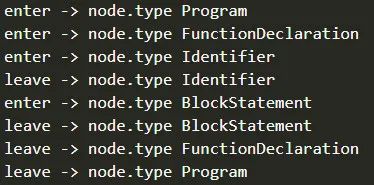
由此可得到 AST 遍历的过程是深度优先,遍历过程如下:
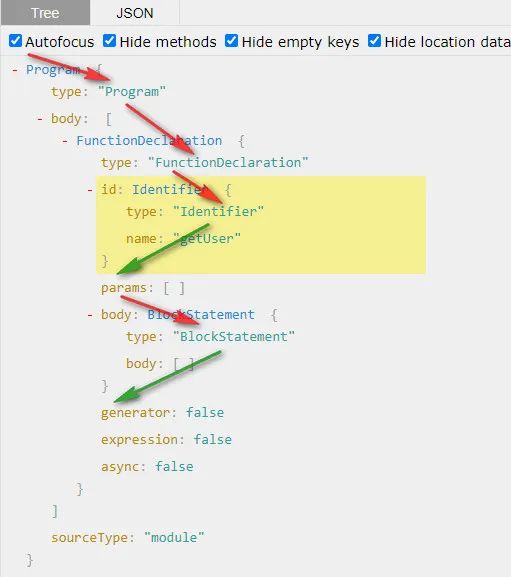
修改函数名字
此时我们发现函数的名字在 type 为 Identifier 的时候就是该函数的名字,我们就可以直接修改它便可实现一个更改函数名字的 AST 工具
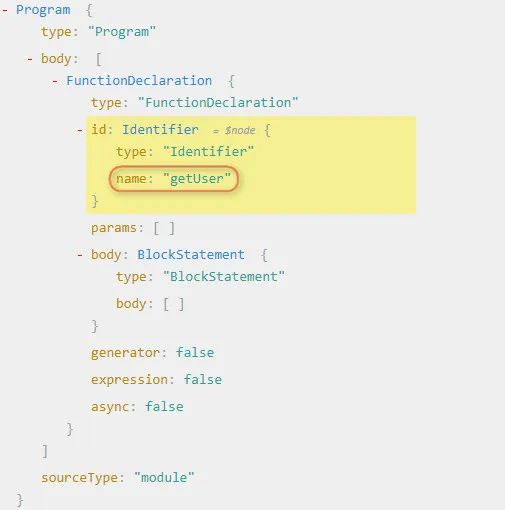
// 转换树
estraverse.traverse(ast, {
  // 进入离开修改都是可以的
  enter(node) {
    console.log("enter -> node.type", node.type);
    if (node.type === "Identifier") {
      node.name = "hello";
    }
  },
  leave(node) {
    console.log("leave -> node.type", node.type);
  },
});
// 生成新的代码
const result = escodegen.generate(ast);
console.log(result);
// function hello() {}
2
3
4
5
6
7
8
9
10
11
12
13
14
15
16
17
# Babel 工作原理
提到 AST 我们会想到 babel,自 ES6 大规模使用以来,babel 就出现了,它主要解决了一些浏览器不兼容 ES6 新特性的问题,就是把 ES6 代码转换为 ES5 代码,兼容所有浏览器,babel 转换代码其实就是用了 AST。
那我们在 babel 中使用 AST,看看 babel 是如何编译的?
需要用到两个工具包@babel/core、@babel/preset-env
当我们配置 babel 的时候,不管在.babelrc或babel.config.js文件里面配置的都有presets和 plugins两个配置项
# 插件和预设的区别
// .babelrc
{
  "presets": ["@babel/preset-env"],
  "plugins": []
}
2
3
4
5
当我们配置了presets中有@babel/preset-env,那么@babel/core就会去找preset-env预设的插件包,它是一套。
babel 核心包并不会去转换代码,核心包只提供一些核心 API,真正的代码转换工作由插件或预设来完成,比如转换箭头函数,会用到@babel/plugin-transform-arrow-functions这个 plugin,当需要转换的要求增加时,我们不能去一一配置相应的 plugin,这时就可以用到预设了,也就是 presets。presets 是 plugins 的集合,一个 presets 内部包含了很多 plugin。
# babel 插件的使用
现在我们有一个箭头函数,要把它转成普通函数,我们可以直接这么写
const babel = require("@babel/core");
const code = `const fn = (a, b) => a + b`;
// babel 有 transform 方法会帮我们自动遍历,使用相应的预设或者插件转换相应的代码
const r = babel.transform(code, {
  presets: ["@babel/preset-env"],
});
console.log(r.code);
// 打印结果如下
// "use strict";
// var fn = function fn() { return a + b; };
2
3
4
5
6
7
8
9
10
我们可以看到代码被转为普通函数,但我们只要箭头函数转为普通函数的功能,不需要这么大一套包,其实我们可以在node_modules下面找到plugin-transform-arrow-functions的插件,此插件专门处理箭头函数的,可以这么写
const r = babel.transform(code, {
  plugins: ["@babel/plugin-transform-arrow-functions"],
});
console.log(r.code);
// 打印结果如下
// const fn = function () { return a + b; };
2
3
4
5
6
从结果可看出只转换了箭头函数。
# 编写自己的插件
实战:把const fn = (a, b) => a + b转换为const fn = function () { return a + b }
分析 AST 结构
首先我们在在线分析 AST 的网站分析
const fn = (a, b) => a + b和const fn = function () { return a + b }两者语法树的区别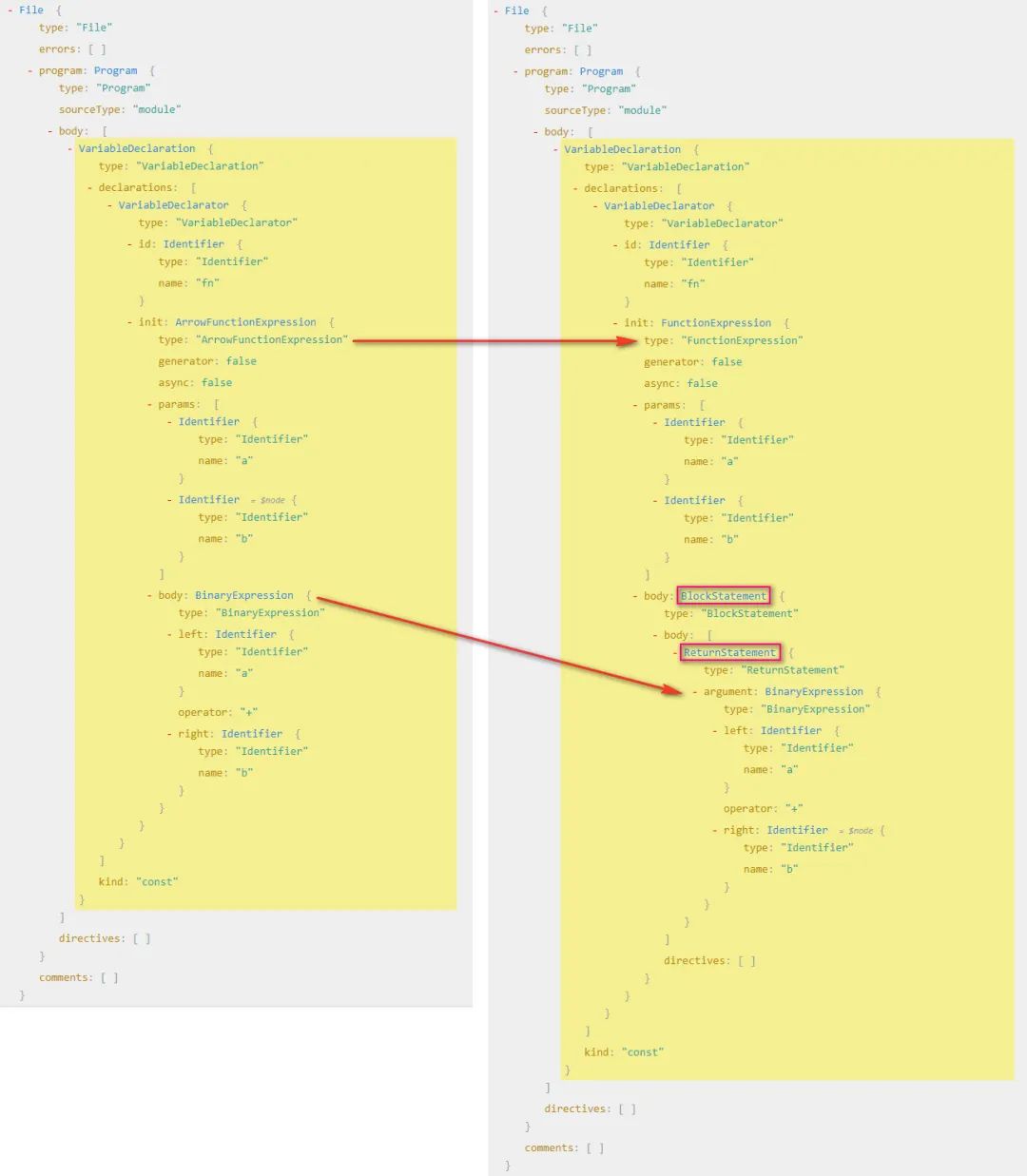
分析可得:
- 变成普通函数后箭头函数
ArrowFunctionExpression变成函数表达式FunctionExpression - 所以我们要把
箭头函数表达式(ArrowFunctionExpression)转换为函数表达式(FunctionExpression) - 要把
二进制表达式(BinaryExpression)放到一个代码块中(BlockStatement) - 其实我们要做的就是把一棵树变成另一棵树,即拼成另一棵树的结构,然后生成新的代码,就可以完成代码的转换
- 变成普通函数后箭头函数
访问者模式
在 babel 中,我们开发 plugins 的时候要用到访问者模式,就是在访问到某一个路径的时候进行匹配,然后对这个节点进行修改,如当我们访问到
ArrowFunctionExpression的时候,对ArrowFunctionExpression进行修改,变成普通函数const babel = require("@babel/core"); const code = `const fn = (a, b) => a + b`; // 转换后 const fn = function(a, b) { return a + b } const arrowFnPlugin = { // 访问者模式 visitor: { // 当访问到某个路径的时候进行匹配 ArrowFunctionExpression(path) { // 拿到节点 const node = path.node; console.log("ArrowFunctionExpression -> node", node); }, }, }; const r = babel.transform(code, { plugins: [arrowFnPlugin], }); console.log(r);1
2
3
4
5
6
7
8
9
10
11
12
13
14
15
16
17
18
19修改 AST 结构
此时我们拿到节点,其实就是
ArrowFunctionExpression的 AST,此时,我们要把ArrowFunctionExpression的结构替换成FunctionExpression的结构,但需要我们组装类似的结构,直接写很麻烦,但 babel 为我们提供了个工具@babel/types@babel/types的作用- 判断这个节点是不是这个节点(ArrowFunctionExpression 下面的 path.node 是不是一个 ArrowFunctionExpression)
- 生成对应的表达式
t.functionExpression(id, params, body, generator, async)- id: Identifier (default: null) id 可传递 null
- params: Array
(required) 函数参数,可以把之前的参数拿过来 - body: BlockStatement (required) 函数体,接受一个 BlockStatement 我们需要生成一个
- generator: boolean (default: false) 是否为 generator 函数,当然不是了
- async: boolean (default: false) 是否为 async 函数,肯定不是了
t.blockStatement(body, directives)- 看文档说明,blockStatement 接受一个 body,那我们把之前的 body 拿过来就可以直接用,不过这里 body 接受一个数组
现在我们开始改写 AST 了
const babel = require("@babel/core");
const t = require("@babel/types");
const code = `const fn = (a, b) => a + b`; // const fn = function(a, b) { return a + b }
const arrowFnPlugin = {
  // 访问者模式
  visitor: {
    // 当访问到某个路径的时候进行匹配
    ArrowFunctionExpression(path) {
      // 拿到节点然后替换节点
      const node = path.node;
      console.log("ArrowFunctionExpression -> node", node);
      // 拿到函数的参数
      const params = node.params;
      const body = node.body;
      const functionExpression = t.functionExpression(
        null,
        params,
        t.blockStatement([body])
      );
      // 替换原来的函数
      path.replaceWith(functionExpression);
    },
  },
};
const r = babel.transform(code, {
  plugins: [arrowFnPlugin],
});
console.log(r.code); // const fn = function (a, b) { return a + b; };
1
2
3
4
5
6
7
8
9
10
11
12
13
14
15
16
17
18
19
20
21
22
23
24
25
26
27
28特殊情况
我们知道在剪头函数中是可以省略 return 关键字,我们上面是处理了省略关键字的写法,但是如果用户写了 return 关键字后,我们写的这个插件就有问题了,所以我们可以在优化一下
const fn = (a, b) => { retrun a + b }->const fn = function(a, b) { return a + b }观察代码我们发现,我们就不需要把 body 转换成 blockStatement 了,直接放过去就可以了,那么我们就可以这么写const babel = require("@babel/core"); const t = require("@babel/types"); const code = `const fn = (a, b) => a + b`; // const fn = function(a, b) { return a + b } const arrowFnPlugin = { // 访问者模式 visitor: { // 当访问到某个路径的时候进行匹配 ArrowFunctionExpression(path) { // 拿到节点然后替换节点 const node = path.node; console.log("ArrowFunctionExpression -> node", node); const params = node.params; let body = node.body; // 判断是不是 blockStatement,不是的话让他变成 blockStatement if (!t.isBlockStatement(body)) { body = t.blockStatement([body]); } const functionExpression = t.functionExpression( null, params, t.blockStatement([body]) ); // 替换原来的函数 path.replaceWith(functionExpression); }, }, }; const r = babel.transform(code, { plugins: [arrowFnPlugin], }); console.log(r.code); // const fn = function (a, b) { return a + b; };1
2
3
4
5
6
7
8
9
10
11
12
13
14
15
16
17
18
19
20
21
22
23
24
25
26
27
28
29
30
31
# 按需引入
在开发中,我们引入 UI 框架,如 vue 中用到element-ui、vant或 react中的antd都支持全局引入和按需引入,默认是全局引入,如果需要按需引入就安装一个babel-plugin-import的插件,将全局的写法变成按需引入的写法。
就拿我最近开发移动端用的 vant 为例, import { Button } from 'vant' 这种写法经过这个插件之后会变成 import Button from 'vant/lib/Button' 这种写法,引用整个 vant 变成了我只用了 vant 下面的某一个文件,打包后的文件会比全部引入的文件大小要小很多
分析语法树
import { Button, Icon } from 'vant'写法转换为import Button from 'vant/lib/Button';、import Icon from 'vant/lib/Icon'看下语法树的区别
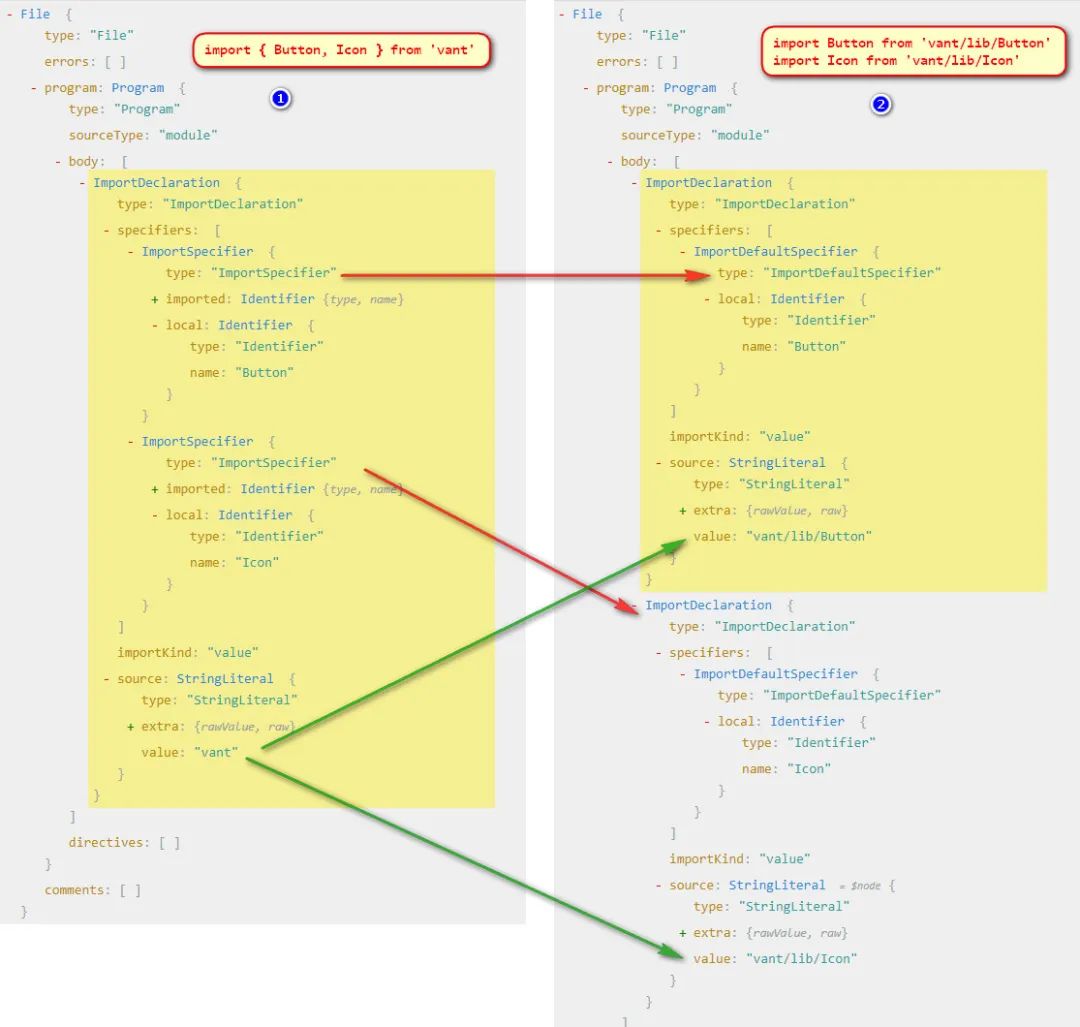
由图分析得:
- 我们发现解构方式引入的模块只有 import 声明,第二张图是两个 import 声明
- 解构方式引入的详细说明里面(
specifiers)是两个ImportSpecifier,第二张图里面是分开的,而且都是ImportDefaultSpecifier - 他们引入的 source 也不一样
- 那我们要做的其实就是要把单个的
ImportDeclaration变成多个ImportDeclaration, 然后把单个import解构引入的specifiers部分ImportSpecifier转换成多个ImportDefaultSpecifier并修改对应的source即可
分析类型 这里我们需要用到的几个类型,也需在 types 官网上找对应的解释
- 首先我们要生成多个
importDeclaration类型/** * @param {Array<ImportSpecifier | ImportDefaultSpecifier | ImportNamespaceSpecifier>} specifiers (required) * @param {StringLiteral} source (required) */ t.importDeclaration(specifiers, source);1
2
3
4
5 - 在
importDeclaration中需要生成ImportDefaultSpecifier/** * @param {Identifier} local (required) */ t.importDefaultSpecifier(local);1
2
3
4 - 在
importDeclaration中还需生成一个StringLiteral/** * @param {string} value (required) */ t.stringLiteral(value);1
2
3
4
- 首先我们要生成多个
上代码
const babel = require("@babel/core");
const t = require("@babel/types");
const code = `import { Button, Icon } from 'vant'`;
// import Button from 'vant/lib/Button'
// import Icon from 'vant/lib/Icon'
function importPlugin(opt) {
  const { libraryDir } = opt;
  return {
    visitor: {
      ImportDeclaration(path) {
        const node = path.node;
        // console.log("ImportDeclaration -> node", node)
        // 得到节点的详细说明,然后转换成多个的 import 声明
        const specifiers = node.specifiers;
        // 要处理这个我们做一些判断,首先判断不是默认导出我们才处理,要考虑 import vant, { Button, Icon } from 'vant' 写法
        // 还要考虑 specifiers 的长度,如果长度不是 1 并且不是默认导出我们才需要转换
        if (
          !(
            specifiers.length === 1 &&
            t.isImportDefaultSpecifier(specifiers[0])
          )
        ) {
          const result = specifiers.map((specifier) => {
            const local = specifier.local;
            const source = t.stringLiteral(
              `${node.source.value}/${libraryDir}/${specifier.local.name}`
            );
            // console.log("ImportDeclaration -> specifier", specifier)
            return t.importDeclaration(
              [t.importDefaultSpecifier(local)],
              source
            );
          });
          console.log("ImportDeclaration -> result", result);
          // 因为这次要替换的 AST 不是一个,而是多个的,所以需要 `path.replaceWithMultiple(result)` 来替换,但是一执行发现死循环了
          path.replaceWithMultiple(result);
        }
      },
    },
  };
}
const r = babel.transform(code, {
  plugins: [importPlugin({ libraryDir: "lib" })],
});
console.log(r.code);
1
2
3
4
5
6
7
8
9
10
11
12
13
14
15
16
17
18
19
20
21
22
23
24
25
26
27
28
29
30
31
32
33
34
35
36
37
38
39
40
41
42
43
44
45结果如下:
ImportDeclaration -> result [ { type: 'ImportDeclaration',
    specifiers: [ [Object] ],
    source: { type: 'StringLiteral', value: 'vant/lib/Button' } },
{ type: 'ImportDeclaration',
    specifiers: [ [Object] ],
    source: { type: 'StringLiteral', value: 'vant/lib/Icon' } } ]
import Button from "vant/lib/Button";
import Icon from "vant/lib/Icon";
1
2
3
4
5
6
7
8特殊情况 如果用户不全部按需加载了,按需加载只是一种选择,即
import vant, { Button, Icon } from 'vant',我们的插件就出问题了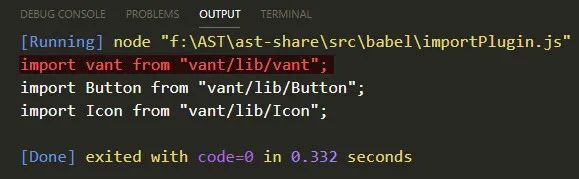
如果遇到这种写法,那么默认导入的他的
source是不变的,我们要把原来的source拿出来所以还需要判断一下,每一个
specifier是不是一个ImportDefaultSpecifier然后处理不同的source,完整处理逻辑应该如下function importPlugin(opt) { const { libraryDir } = opt; return { visitor: { ImportDeclaration(path) { const node = path.node; // console.log("ImportDeclaration -> node", node) // 得到节点的详细说明,然后转换成多个的 import 声明 const specifiers = node.specifiers; // 要处理这个我们做一些判断,首先判断不是默认导出我们才处理,要考虑 import vant, { Button, Icon } from 'vant' 写法 // 还要考虑 specifiers 的长度,如果长度不是 1 并且不是默认导出我们才需要转换 if ( !( specifiers.length === 1 && t.isImportDefaultSpecifier(specifiers[0]) ) ) { const result = specifiers.map((specifier) => { let local = specifier.local, source; // 判断是否存在默认导出的情况 if (t.isImportDefaultSpecifier(specifier)) { source = t.stringLiteral(node.source.value); } else { source = t.stringLiteral( `${node.source.value}/${libraryDir}/${specifier.local.name}` ); } return t.importDeclaration( [t.importDefaultSpecifier(local)], source ); }); path.replaceWithMultiple(result); } }, }, }; }1
2
3
4
5
6
7
8
9
10
11
12
13
14
15
16
17
18
19
20
21
22
23
24
25
26
27
28
29
30
31
32
33
34
35
36
37
38
39
# babyLon
# babyLon 与 babel 的关系
babel 使用的引擎是 babylon,Babylon 并非 babel 团队自己开发的,而是 fork 的 acorn 项目,acorn 的项目本人在很早之前在兴趣部落 1.0 在构建中使用,为了是做一些代码的转换,是很不错的一款引擎,不过 acorn 引擎只提供基本的解析 ast 的能力,遍历还需要配套的 acorn-travesal, 替换节点需要使用 acorn-,而这些开发,在 Babel 的插件体系开发下,变得一体化了(摘自 AlloyTeam 团队的剖析 babel)
# 使用 babyLon
使用 babylon 编写一个数组 rest 转 Es5 语法的插件
把 const arr = [ ...arr1, ...arr2 ] 转成 var arr = [].concat(arr1, arr2)
分析语法树
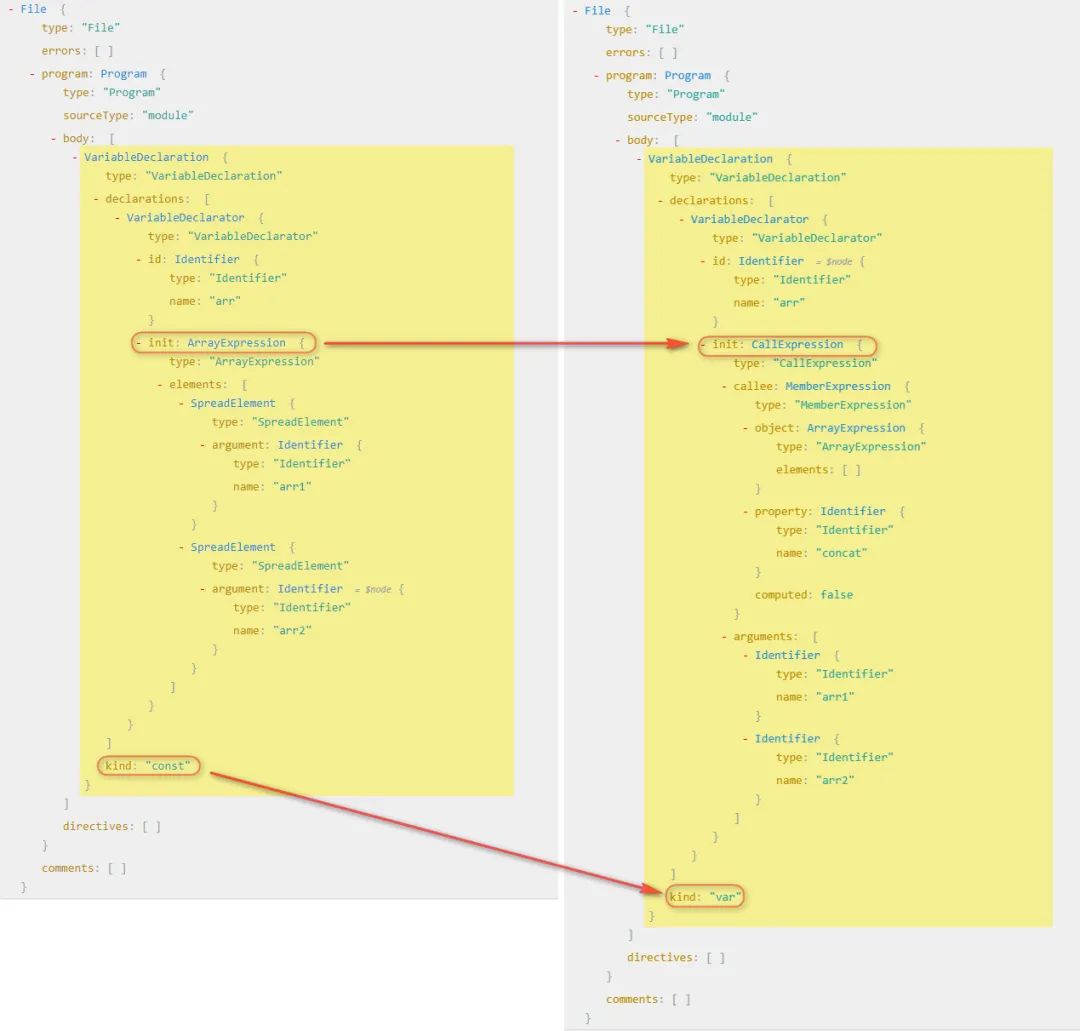 由图分析得:
- 两棵树都是变量声明的方式,不同的是他们声明的关键字不一样
- 他们初始化变量值的时候是不一样的,一个数组表达式(ArrayExpression)另一个是调用表达式(CallExpression)
- 那就很简单了,把数组表达式转换为调用表达式就可以
分析类型 这段代码的核心生成一个 callExpression 调用表达式,所以对应官网上的类型,我们分析需要用到的 api
先来分析 init 里面,首先是 callExpression
/**
 * @param {Expression} callee  (required)
 * @param {Array<Expression | SpreadElement | JSXNamespacedName>} source (required)
 */
t.callExpression(callee, arguments);
1
2
3
4
5对应语法树上 callee 是一个 MemberExpression,所以要生成一个成员表达式
/**
 * @param {Expression} object  (required)
 * @param {if computed then Expression else Identifier} property (required)
 * @param {boolean} computed (default: false)
 * @param {boolean} optional (default: null)
 */
t.memberExpression(object, property, computed, optional);
1
2
3
4
5
6
7在 callee 的 object 是一个 ArrayExpression 数组表达式,是一个空数组
/**
 * @param {Array<null | Expression | SpreadElement>} elements  (default: [])
 */
t.arrayExpression(elements);
1
2
3
4里面的东西分析完了,我们还要生成 VariableDeclarator 和 VariableDeclaration 最终生成新的语法树
/**
 * @param {LVal} id  (required)
 * @param {Expression} init (default: null)
 */
t.variableDeclarator(id, init);

/**
 * @param {"var" | "let" | "const"} kind  (required)
 * @param {Array<VariableDeclarator>} declarations (required)
 */
t.variableDeclaration(kind, declarations);
1
2
3
4
5
6
7
8
9
10
11
上代码
const babylon = require("babylon");
// 使用 babel 提供的包,traverse 和 generator 都是被暴露在 default 对象上的
const traverse = require("@babel/traverse").default;
const generator = require("@babel/generator").default;
const t = require("@babel/types");

const code = `const arr = [ ...arr1, ...arr2 ]`; // var arr = [].concat(arr1, arr2)

const ast = babylon.parse(code, {
  sourceType: "module",
});

// 转换树
traverse(ast, {
  VariableDeclaration(path) {
    const node = path.node;
    const declarations = node.declarations;
    console.log("VariableDeclarator -> declarations", declarations);
    const kind = "var";
    // 边界判定
    if (
      node.kind !== kind &&
      declarations.length === 1 &&
      t.isArrayExpression(declarations[0].init)
    ) {
      // 取得之前的 elements
      const args = declarations[0].init.elements.map((item) => item.argument);
      const callee = t.memberExpression(
        t.arrayExpression(),
        t.identifier("concat"),
        false
      );
      const init = t.callExpression(callee, args);
      const declaration = t.variableDeclarator(declarations[0].id, init);
      const variableDeclaration = t.variableDeclaration(kind, [declaration]);
      path.replaceWith(variableDeclaration);
    }
  },
});
1
2
3
4
5
6
7
8
9
10
11
12
13
14
15
16
17
18
19
20
21
22
23
24
25
26
27
28
29
30
31
32
33
34
35
36
37
38
39
# 具体语法树
和抽象语法树相对的是具体语法树(Concrete Syntax Tree)简称 CST(通常称作分析树)。一般的,在源代码的翻译和编译过程中,语法分析器创建出分析树。一旦 AST 被创建出来,在后续的处理过程中,比如语义分析阶段,会添加一些信息。
关于 node 类型,全集大致如下
(parameter) node: Identifier | SimpleLiteral | RegExpLiteral | Program | FunctionDeclaration | FunctionExpression | ArrowFunctionExpression | SwitchCase | CatchClause | VariableDeclarator | ExpressionStatement | BlockStatement | EmptyStatement | DebuggerStatement | WithStatement | ReturnStatement | LabeledStatement | BreakStatement | ContinueStatement | IfStatement | SwitchStatement | ThrowStatement | TryStatement | WhileStatement | DoWhileStatement | ForStatement | ForInStatement | ForOfStatement | VariableDeclaration | ClassDeclaration | ThisExpression | ArrayExpression | ObjectExpression | YieldExpression | UnaryExpression | UpdateExpression | BinaryExpression | AssignmentExpression | LogicalExpression | MemberExpression | ConditionalExpression | SimpleCallExpression | NewExpression | SequenceExpression | TemplateLiteral | TaggedTemplateExpression | ClassExpression | MetaProperty | AwaitExpression | Property | AssignmentProperty | Super | TemplateElement | SpreadElement | ObjectPattern | ArrayPattern | RestElement | AssignmentPattern | ClassBody | MethodDefinition | ImportDeclaration | ExportNamedDeclaration | ExportDefaultDeclaration | ExportAllDeclaration | ImportSpecifier | ImportDefaultSpecifier | ImportNamespaceSpecifier | ExportSpecifier
Babel (opens new window) 有文档对 AST 树的详细定义,详细可以参考